HTML Forms
Hello all,
I am Manasa, I was a Mechanical Engineer for 2 years and embarked on my career in Front-end-web development from 2022. Looking forward to sharing the content that I have grasped through my experience and learnings on this platform.
HTML Forms are used to take the information from User. Just like Facebook login page or Amazon sign up page etc... And the user input is most often sent to server for processing.
In the Form tag action attribute is where we write our "url". So, When the user clicks the "Submit" button, the form-data will be sent to that particular "url".
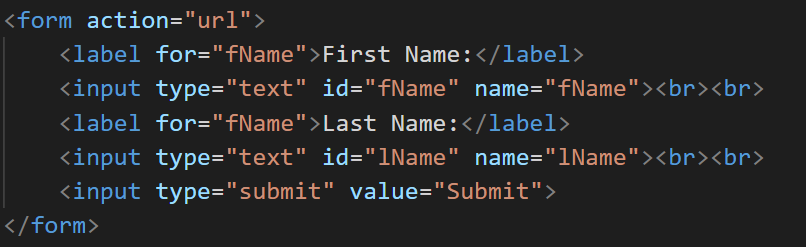
Label tag is used to create labels for input fields. So the User knows what to input on the first text area. Inside Label tag we should always mention "for" attribute. It is recommendable for accessibility and also to process relevant information on the server side.
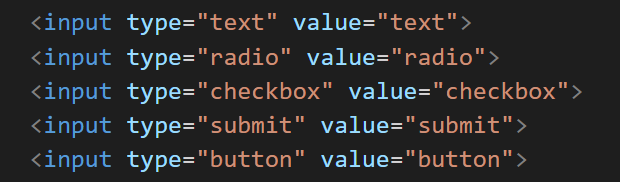
Input tag is used to create a text area where user can input their data. Input tag is same like break tag its a self closing tag. Its always a good idea to write "input type" so the browser will give us what we want like below and also good practice to include "id" and "name"
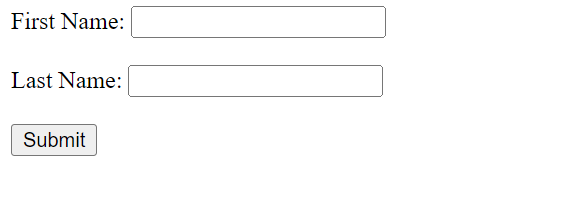
input type="text": Displays a single-line text input field
input type="radio": Displays a radio button (for selecting one of many choices)
input type="checkbox": Displays a checkbox (for selecting zero or more of many choices)
input type="submit": Displays a submit button (for submitting the form)
input type="button": Displays a clickable button